
Running a business without the use of the right tools is like driving without a map. You may end up getting there but you will have lost time, energy and resources. When businesses need to optimise customer relationships, increase sales, and grow operations, selecting the most appropriate Customer Relationship Management (CRM) system is not only beneficial, but it is also crucial.
A CRM is a hub of all customer relations, at the point of first contact as well as in the long-term. It collects and manages customer data, automates the processes, and monitors sales opportunities and gives insights that help grow the business. But, there are so many options available, so how do you get the best CRM that will fit your unique needs?
This ultimate guide will take you through all the information you need to know about the selection of the right CRM in your business. You will find out how to evaluate your needs, compare the most important features, prevent the most frequent mistakes, and make a choice that will benefit your current business and its further development.
Understanding CRM Systems: The Foundation of Customer Success
Customer Relationship Management (CRM) software is a tool that organizes all the information and communications involving customers in a single location. It is basically a virtual command center where your sales, marketing and customer service departments can work in harmony.
The modern CRM systems include contact management systems only as a minor component They offer automation of workflow, management of sales pipelines, analytics, and integrations of other business tools. The appropriate CRM turns chaotic relations with customers into a systematic approach that generates income and increases customer enjoyment.
Types of CRM Systems
It is easy to search with the knowledge of the three CRM systems:
Operational CRM is concerned with automation and convenience of the processes that involve customers. They work very well in sales funnels, marketing programs and customer support functions. They are perfect in the companies that are interested in increasing efficiency and minimizing manual work.
Analytical CRM deals with facts and information on customers. These systems will enable you to know the customer behavior patterns, predict the sales trends and find the growth opportunities. Analytical CRMs are popular with companies that are data driven in their decision making.
Collaborative CRM helps in communication and sharing of information between the departments. Such systems make sure that the sales, marketing, and customer service departments remain in sync and are able to deliver regular customer experiences.
Most of the current CRM systems have taken a mix of all these three types and provide integrated solutions that serve a variety of business requirements.
Assessing Your Business Requirements
It is better to step back and assess what your business requirements are before considering the CRM options. It is on the basis of this evaluation that a decision is taken.
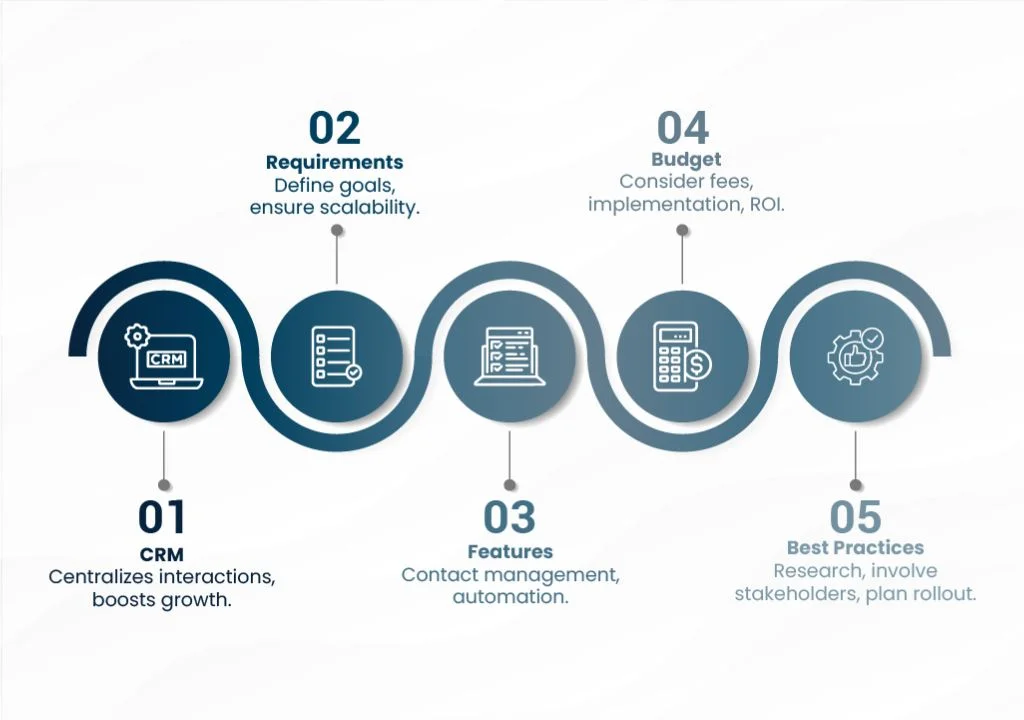
Define Your Primary Goals
Start by saying what you are going to do with CRM. The common objectives are
- The raising of the sales conversion rates
- Successful business development
- The success of inter-team communication
- Being able to understand the business performance better
- Productive business building
You have to understand what you desire. Instead of saying that we are going to enhance sales, define the target like increase conversion of leads to sales by 25 percent or reduce the sales cycle to two weeks by half.
Evaluate Your Current Processes
Look at the customer relationship management that your team is doing now. Record existing processes, identify the areas of pain and record the areas to be automated that save time. In this discussion, gaps to be filled by your new CRM will be identified.
Consider questions like:
- How do you currently track leads and opportunities?
- What manual tasks consume the most time?
- Where do customer interactions fall through the cracks?
- How well do your teams collaborate on customer accounts?
Consider Your Business Size and Growth Plans
Your company size and the growth trajectory are very dependent on the CRM requirements. The small business might be more concerned with low cost and ease, but the large organizations will need high customization and feature rich products.
The future growth should not be overlooked. Select a CRM that has the potential to grow with your business as opposed to the one that fits your present requirements.
Essential CRM Features to Consider
Although each company has its own needs, there are some functions that are useful in all kinds of businesses and of all sizes.
Contact and Lead Management
Contact management does not only mean name and phone numbers. Seek systems which monitor history of interaction, sort and classify contacts and give comprehensive customer profile. TThe new lead management features are lead scoring, auto assignment and conversion tracking.
Sales Pipeline Management
Visual pipeline management assists sales teams to follow opportunities by monitoring the opportunities since the first contact to the end. The most effective systems provide the customization of pipeline steps, the automation of task generation and forecasting, which enhance the predictions of sales.
Integration Capabilities
The CRM that you implement must be able to work with other business tools that you have. The most common of them are email systems, accounting, marketing automation, and customer support. The Native integrations are stable in general in comparison to the third party connections.
Automation and Workflow Tools
Automation eliminates the monotony and brings in standardization. Find the following features: automated emails, the ability to create tasks, and data entry. The workflow builders in advanced systems allow you to build complex automation rules without any knowledge of code.
Reporting and Analytics
Knowledge is data-driven in the business. The advanced reporting should be in a position to deliver customized dashboards, performance and trend analysis. The possibility to create reports within a short time and distribute them among teams is priceless when it comes to strategic planning.
Mobile Access
Contemporary companies have to work in various locations and time zones. The access to the mobile CRM enables team members to update the records, access the customer information and manage tasks even when they are not at their desks.
Budgeting for Your CRM Investment
Prices of CRM vary radically according to functions, the number of users and the provider. The knowledge of the overall costs will enable you to make financial decisions.
Hidden Costs to Consider
Besides the subscription fees, there is to be considered:
- Implementation and installation cost
- Data migration cost
- Training and onboarding time
- Integration development
- Ongoing support and maintenance
These overheads may also impact significantly on the overall investment, hence include them in the budget..
Calculating Return on Investment
Estimate the potential benefits of CRM implementation:
- Increased sales from improved lead management
- Time savings through automation
- Better customer retention rates
- Enhanced team productivity
Compare these projected benefits against total costs to determine expected ROI and justify the investment.
Evaluating CRM Providers
Once you understand your needs and budget, begin evaluating specific CRM solutions.
Research and Reviews
One can start by conducting research on providers that other companies similar to yours use. Good sources of information on how software performs are industry magazines, software review websites and peer referrals.
Look at the reviews of people who use it and mention the implementation challenges, customer support quality, and satisfaction in the long run. Be concerned with the patterns of the feedback as opposed to complaints or compliments.
Free Trials and Demos
Most of the well-known CRM vendors offer trial or demonstration. Take advantage of these opportunities to test functionality firsthand. During trials:
- Import sample data to test real-world scenarios
- Involve multiple team members in the evaluation
- Test integration with existing tools
- Evaluate user interface and ease of use
- Assess mobile functionality
Vendor Support and Training
Quality customer support becomes crucial during implementation and ongoing use. Evaluate support options including:
- Available support channels (phone, email, chat)
- Response times and availability hours
- Training resources and documentation
- Implementation assistance
Poor support can turn a great CRM into a frustrating experience, so prioritize providers with strong service reputations.
Implementation Best Practices
It is not enough to choose the right CRM. Successful implementation requires careful planning and execution.
Planning Your Rollout
Develop a detailed implementation plan that includes:
- Data migration timeline
- User training schedule
- Integration setup
- Testing phases
- Go-live date
Consider a phased rollout that starts with a small team before expanding company-wide. The practice will help you identify and solve issues before the full implementation.
Data Migration and Cleanup
It is clean and accurate data that makes CRM successful.. Before migration:
- Remove duplicate contacts
- Standardize data formats
- Verify contact information accuracy
- Organize data into logical categories
Poor data quality undermines even the best CRM systems, so invest time in cleanup efforts.
User Training and Adoption
The most sophisticated CRM fails without user adoption. Provide comprehensive training that covers:
- Basic system navigation
- Daily workflow processes
- Advanced features relevant to each role
- Best practices for data entry
Ongoing training and support help maintain high adoption rates and maximize system value.
Common Mistakes to Avoid
Learning from others’ mistakes saves time and resources during your CRM selection process.
Choosing Based on Features Alone
While features matter, user experience often determines success. A CRM with extensive capabilities means nothing if your team struggles to use it effectively. Balance functionality with usability during evaluation.
Underestimating Implementation Time
CRM implementation typically takes longer than expected. Factor in data migration, integration setup, user training, and adjustment periods. Implementation problems and poor results are common when there is a rush in implementation.
Ignoring Scalability
Your business will evolve, and your CRM should grow with you. Systems that work for 10 users might struggle with 100. Consider long-term needs rather than just current requirements.
Focusing Only on Price
While budget matters, the cheapest option rarely provides the best value. Consider the total cost of ownership such as the implementation, training and the support. A slightly more expensive CRM that boosts productivity often provides better ROI than a bargain solution that hinders growth.
Making Your Final Decision
After thorough evaluation, use a structured approach to make your final choice.
Create a Comparison Matrix
Develop a scoring system that weighs each CRM against your requirements. Include factors like:
- Essential feature availability
- Ease of use ratings
- Integration capabilities
- Support quality
- Total cost
This systematic approach reduces bias and ensures you consider all important factors.
Involve Key Stakeholders
Incorporate the sales, marketing, customer service and IT representatives in the decision making process. All the departments have distinct opinions that enhance the final decision.
Plan for the Future
Think of how your needs will probably change in the next 3-5 years and make sure that your chosen system will be able to handle that change.
Maximizing Your CRM Investment
The choice of the appropriate CRM is only the first step of your path towards improved customer relationship management. The success factor is a thought-through implementation, constant optimization, and adoption by the users.
It is important to remember that CRM systems are most effective when they fit your business processes and not when you are required to adjust your business operations to the demands of the software. The perfect solution must be intuitive to your team and at the same time offer the functionality to accomplish your objectives.
Good decision should not be rushed. The hasty process of selection can be followed by buyer remorse and costly system changes in the future. Make an investment in effective assessment, design, and deployment so that your CRM does not end up being a white elephant that is being underutilized.
The correct CRM will change the process of customer relationship management and lead to growth and increased satisfaction. When done with a lot of thought and planning, your investment will yield returns in the years ahead.
FAQs:
1. What is a CRM and why does my business need one?
A CRM (Customer Relationship Management) system centralizes customer data and interactions for sales, marketing, and support teams. It helps automate workflows, track sales opportunities, and provide insights, all of which improve customer relations, increase sales, and support business growth.
2. How do I assess my business requirements before choosing a CRM?
Start by defining clear business goals such as increasing sales conversion or improving team collaboration. Evaluate your current customer management processes to identify pain points and tasks to automate. Also consider your business size and future growth plans to ensure the CRM can scale with you.
3. What are the essential CRM features I should look for?
Important features include contact and lead management, customizable sales pipeline tracking, automation tools for routine tasks, integration capabilities with other business software, reporting and analytics, and mobile access for on-the-go use.
4. How do I budget effectively for a CRM system?
Consider not only subscription fees but also costs related to implementation, data migration, user training, integration development, and ongoing support. Compare these against expected benefits like increased sales and productivity to estimate your return on investment.
5. What are best practices for selecting and implementing a CRM?
Research providers thoroughly, read user reviews, and test free trials or demos. Involve key stakeholders from various departments in the decision. Plan your rollout carefully, including data cleanup and phased implementation, and provide comprehensive training to maximize adoption and long-term success.